
What Is an Industrial Panel PC and How Does It Work?

An Industrial Panel Pc combines a display, computer, and control interface in one rugged enclosure. Unlike an office desktop, it is built for dust, vibration, temperature changes, and continuous operation. Its touchscreen can show production data, alarms, recipes, and machine status at a glance. In a busy factory, an operator may adjust a setting with gloved fingers beside a noisy conveyor. That direct access saves time. It can also reduce confusion during faults. Yet, the panel’s appearance alone does not prove reliability.

Inside the unit, an industrial processor runs the operating system and control software. Memory supports applications, while solid-state storage protects data without moving parts. The system communicates through ports such as Ethernet, USB, serial interfaces, and fieldbus connections. A power supply converts incoming electricity into stable voltages for the internal components. Cooling may use heat sinks, sealed designs, or controlled airflow. The choice depends on heat, dust, and enclosure requirements. Small details matter here.

This article explains what an Industrial Panel Pc is and how it works in real operating conditions. It examines the screen, processor, storage, connectivity, mounting options, and protection ratings. It also compares panel PCs with ordinary computers and separate HMI systems. A practical selection process should consider temperature range, software compatibility, touch accuracy, maintenance access, and long-term support. No device is perfect. Poor ventilation or unsuitable software can still cause failures. Careful specifications and installation testing remain essential for dependable industrial performance.
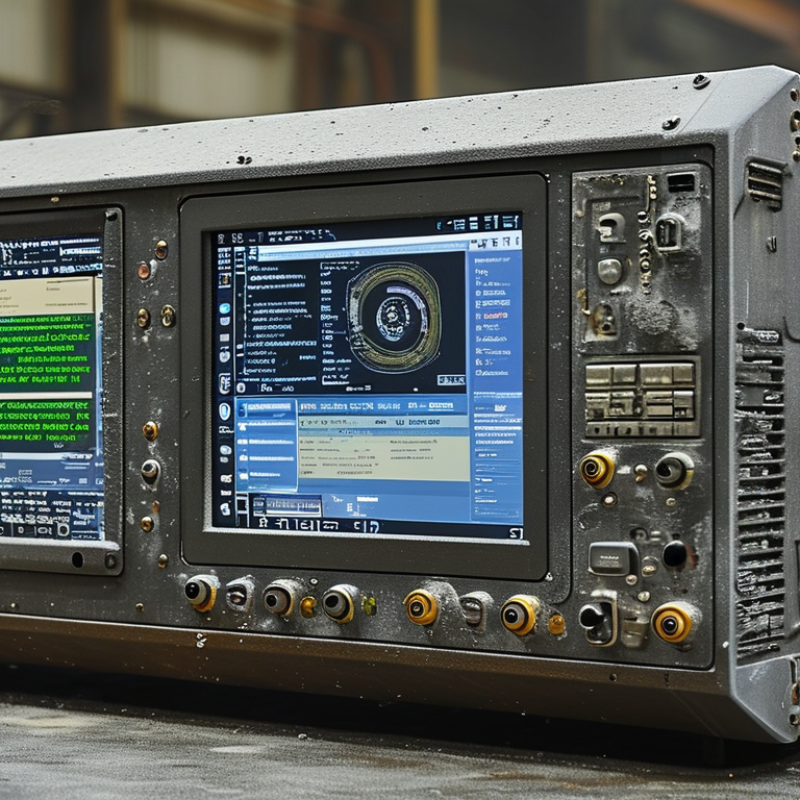
What Is an Industrial Panel PC and How Does It Work?

What Is an Industrial Panel PC?

Industrial panel PCs are rugged computers built into a flat display enclosure. Unlike a standard office desktop, the screen, processor, storage, and industrial I/O share one sealed unit. This design saves cabinet space and reduces loose cables around production equipment. Operators can view machine status, enter settings, and respond to alarms from one touchscreen.

The computer typically runs an operating system and connects with sensors, controllers, scanners, cameras, or factory networks. Its processor handles visualization software, data collection, and control-related applications, while ports support Ethernet, serial communication, USB, or field-specific interfaces. A bright display remains readable under strong workshop lighting. Touch input may work with gloves, although this depends on the panel design.

Built for demanding locations.

An industrial panel PC often uses a reinforced enclosure, wide-temperature components, vibration resistance, and front-panel protection against dust or water. The exact protection level matters; a sealed front does not make the entire unit waterproof. Installation teams should check heat, cleaning methods, mounting depth, and sunlight before selecting a model. I have seen otherwise suitable systems fail because ventilation was ignored. That mistake is easy to repeat. Maintenance access also deserves attention, since a difficult-to-open cabinet can turn a small storage fault into extended downtime.


Core Components and System Architecture

What Is an Industrial Panel PC and How Does It Work?

An industrial panel PC combines a display, computer, and control interface in one rugged enclosure. Its system architecture usually has four layers: the touchscreen, processing unit, input/output interfaces, and operating system. The display presents alarms, production data, and machine controls. Behind it, the processor handles calculations, communication, and application tasks. Memory stores active instructions, while solid-state storage keeps the operating system and historical records.

The I/O layer connects the panel PC to sensors, controllers, cameras, and factory networks. Common interfaces include Ethernet, serial ports, USB, and digital inputs. An internal power module regulates incoming electricity and protects sensitive circuits. Cooling may rely on passive heat dissipation, sealed fans, or both. In dusty areas, fewer moving parts often improve reliability. The enclosure also needs suitable protection against vibration, moisture, and cleaning chemicals. Small details matter. A poorly placed connector can complicate maintenance.

Tips: Check the full signal path before installation. Confirm voltage, port type, network protocol, and mounting depth. Test the touchscreen with gloves and under bright lighting. Leave service access around the enclosure. In practice, cable routing is often underestimated. Keep power and data cables separated where possible. Review temperature limits, too. Field conditions may exceed the room’s average reading. No design is perfect; regular inspection helps reveal assumptions that documentation misses.

How an Industrial Panel PC Processes Data

An industrial panel PC combines a display, computer, and control interface in one rugged enclosure. Its main task is processing machine data close to the equipment. The International Federation of Robotics’ World Robotics 2024 report recorded 541,302 industrial robot installations worldwide in 2023. Each installation can generate cycle counts, temperature readings, alarms, and motion data.

The process begins when sensors send electrical signals through input modules or industrial networks. Drivers translate these signals into usable values. The processor then applies software rules, filters noise, and stores temporary results in memory. Operators see the output through dashboards, trends, or alarm screens. Common protocols include Modbus TCP, EtherNet/IP, and OPC UA. A panel PC may also send selected data to a supervisory system or cloud platform. It should not transmit everything.

That wastes bandwidth.

In field commissioning, engineers often overlook timestamps. A delayed clock can make a fault appear unrelated to its real cause. Network loss creates another weakness. Local storage, watchdog timers, and fanless cooling help the system continue operating. NIST SP 800-82 Rev. 3 emphasizes that operational technology prioritizes availability, integrity, and safety. Therefore, the panel PC needs more than computing power. It needs controlled access, segmented connections, and predictable recovery behavior. A practical design may still fail when vibration loosens a connector or dust restricts cooling. Perfect specifications do not replace disciplined maintenance.

What Is an Industrial Panel PC and How Does It Work? — How an Industrial Panel PC Processes Data
Stage Data Processing Dimension Industrial Panel PC Function Typical Data, Interfaces, or Technologies Processing Output
1 Physical Data Capture Receives measurements and status signals from sensors, machines, controllers, and operator input devices. Temperature Pressure Position Digital I/O Touch Input Raw electrical signals and user commands enter the system.
2 Signal Conversion Converts analog signals into digital values and interprets digital signals through suitable interface hardware or industrial I/O modules. Analog-to-Digital Conversion Digital Inputs Digital Outputs Serial I/O Machine signals become structured numerical or logical data.
3 Data Communication Exchanges data with programmable controllers, distributed I/O, drives, sensors, databases, and supervisory systems. Ethernet USB RS-232/RS-485 CAN Industrial Protocols Data is transferred between the panel PC and connected equipment.
4 Driver and Protocol Handling Operating-system drivers and communication software organize incoming data according to the connected device and protocol. Device Drivers Protocol Frames Registers Tags Raw communications are converted into usable variables and device states.
5 Edge Computation The processor performs calculations close to the machine, reducing the need to send every raw value to a remote server. Scaling Filtering Unit Conversion Boolean Logic Threshold Checks Cleaned measurements, calculated values, and local decisions are produced.
6 Real-Time Monitoring Continuously compares process values with operating limits and updates the human-machine interface. Setpoints Alarms Status Indicators Trends Operators receive current process information and abnormal-condition warnings.
7 Control Instruction Sends authorized commands or control values to connected equipment according to application logic and operator input. Start/Stop Speed Reference Mode Selection Setpoint Update Controllers, actuators, or machines receive actionable instructions.
8 Local Data Storage Records selected process values, events, alarms, operator actions, and system diagnostics for analysis or traceability. Solid-State Storage Event Logs Time Stamps Production Records Historical information remains available for troubleshooting and reporting.
9 Visualization and HMI Presents process data through graphical screens designed for monitoring, configuration, diagnostics, and operator control. Dashboards Mimic Diagrams Charts Alarm Lists Touchscreen Complex machine conditions become understandable visual information.
10 Remote and Higher-Level Integration Shares selected information with supervisory, manufacturing, maintenance, or cloud-connected systems when network access is available. OPC UA MQTT SQL Web Services Industrial Ethernet Production data supports centralized monitoring, analytics, and enterprise reporting.
11 Fault Handling and Diagnostics Detects communication failures, abnormal values, application errors, and hardware conditions, then records or displays diagnostic information. Watchdogs Timeouts Alarm States System Logs Operators and maintenance personnel can identify problems more quickly.
12 Industrial Reliability Supports continuous operation through solid-state storage, fanless cooling in suitable designs, wide-temperature components, sealed front panels, and vibration-resistant construction. IP-Rated Front Panel Fanless Design Solid-State Storage Watchdog Timer Stable data processing is maintained in demanding industrial environments.

Industrial Panel PC Installation and Operation

Industrial panel PCs combine a display, computer, and sealed enclosure for demanding workspaces. They run production dashboards, machine interfaces, inspection software, and maintenance tools. Deloitte’s 2023 Smart Manufacturing and Operations Survey found that 86% of manufacturers expect smart factory initiatives to support competitiveness within five years. That pressure makes reliable installation important, not optional.

Mount the panel PC on a rigid, vibration-resistant surface. Leave clearance around heat-producing areas, even when the enclosure feels cool. Check the datasheet for voltage, grounding, operating temperature, and ingress protection before wiring. IEC 60529 ratings describe protection against dust and water, but they do not guarantee protection from every chemical or cleaning method. Small detail.

Route power and signal cables separately. This reduces electrical noise and makes faults easier to trace. Use shielded cables where the site environment demands them. During operation, operators should watch temperature, storage capacity, network status, and unexpected touch responses. A 2024 report from the International Data Corporation noted that industrial organizations increasingly connect edge devices for real-time decisions, yet connectivity can increase maintenance complexity.

I have seen installations fail because technicians ignored airflow behind the screen. Another common mistake is mounting the unit where sunlight makes the display unreadable. Test the interface with gloves, wet fingers, and normal operator movement. Record firmware versions and inspection dates. The process is rarely perfect; reviewing failed alarms and awkward cable routes often reveals the next improvement.

Common Applications and Selection Criteria

What Is an Industrial Panel PC and How Does It Work?

An industrial panel PC combines a computer, display, and touch interface in one rugged enclosure. It processes machine data, runs control software, and displays operating status. Unlike office computers, it is built for dust, vibration, temperature changes, and continuous operation. Its processor receives signals from sensors or controllers, analyzes them, and sends commands through industrial communication ports. Operators can then adjust settings directly on the screen.

Common Applications and Selection Criteria

Industrial panel PCs appear on production lines, packaging equipment, warehouse systems, and energy monitoring stations. In a food-processing area, a sealed front panel helps resist moisture and frequent cleaning. In a factory, a wide display can show alarms, production counts, and maintenance data at once. Water treatment facilities may use them to monitor pumps and chemical levels. They also support remote diagnostics, reducing unnecessary visits to equipment rooms.

Selection should begin with the working environment, not screen size. Check the required temperature range, enclosure rating, vibration resistance, and mounting method. A bright display matters near windows. Glove-friendly touch input matters on factory floors. For washdown areas, choose a highly sealed front surface. Also confirm processor performance, memory, storage reliability, and communication interfaces. An attractive specification can still fail when software needs more resources than expected. That mistake is common. A practical trial under real lighting and noise is valuable. Leave room for future software updates. The cheapest unit may create higher maintenance costs later.

Start WhatsApp Chat Start WhatsApp Chat
Valves

Valves

Water Meters

MS Forged Pipe Fittings

Fittings

Water Meters

Valves

DI Grooved Fittings (UL/FM)

Water Meters

DI Screwed Fittings (UL/FM)

Fittings

Composite Pipes & Fittings

Site Credits : Seigospace